

Learn why AI agents matter for frontend developers in 2026, how they change development workflows, what skills to learn, and how to build AI-powered applications.

May 2026 | Blogs
Apr 2026 | Blogs
Apr 2026 | Blogs
Mar 2026 | Blogs
Mar 2026 | Blogs
Frontend development has changed a lot over the last few years.
We went from writing HTML, CSS, and JavaScript manually to working with component libraries, React, Next.js, APIs, cloud services, design systems, and AI coding tools. The job is still about building great products, but the tools we use to build those products keep changing.
Now there is another technology frontend developers need to understand: AI agents.
You don't need to become an AI researcher. You don't need to train your own language model. And you definitely don't need to stop being a frontend developer.
But understanding how AI agents work can give you a useful new skill.
AI agents can help developers work with code, APIs, documentation, testing, debugging, and repetitive tasks. At the same time, developers are being asked to build applications where AI doesn't just answer questions but actually helps users complete tasks.
That's why AI agents for frontend developers is becoming an important topic in 2026.
The goal isn't to replace frontend development with AI. It's to understand how the two can work together.
Let's start with the simplest question.
An AI chatbot generally responds to what you ask it.
For example, you might ask:
"How do I fix this React error?"
The chatbot explains the problem and gives you a possible solution.
An AI agent can go a step further.
You could give an agent a goal such as:
"Find why this React component is failing, check the related files, suggest a fix, and run the tests."
Depending on the tools and permissions available to it, the agent may be able to inspect files, call APIs, use development tools, perform multiple steps, evaluate the results, and continue working toward the goal.
The important difference is action.
An agent isn't simply generating a response. It can be designed to work through a task using different tools.
A simple way to think about an AI agent is:
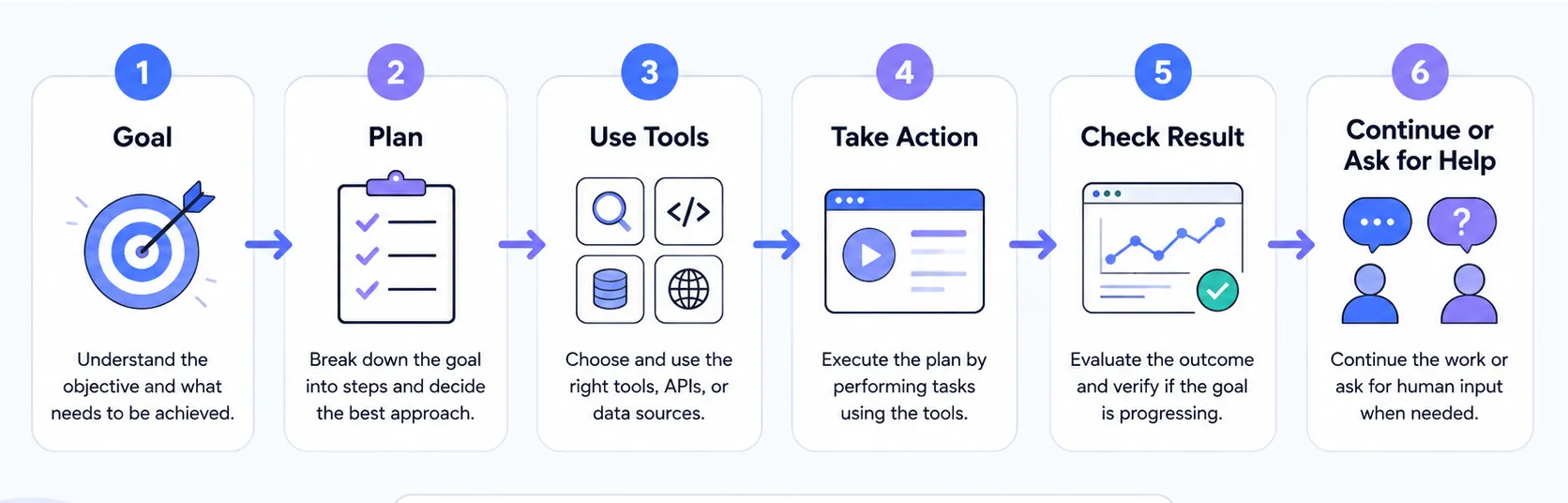
An agent may use several building blocks:
Goal: What are we trying to accomplish?
Context: What information does the agent need?
Tools: What can the agent use?
APIs: What external systems can it communicate with?
Memory: What information should it remember during a task?
Actions: What is it allowed to do?
Feedback: Did the previous action work?
Human approval: When should a person make the final decision?
You don't need to understand every AI concept before experimenting with agents. Start with the basic idea: an AI agent is a system that can use a model together with tools and workflows to accomplish a goal.
You might be thinking:
"Isn't this mostly a backend or AI engineering problem?"
Not anymore.
Frontend developers are increasingly involved in building the interfaces through which users interact with AI systems.
And there are actually two sides to this.
The first is using AI agents to improve your own development workflow.
The second is building frontend applications that use agents.
Both are becoming useful skills.
AI coding tools are already useful for many everyday development tasks.
You can use them to:
Create React components
Explain unfamiliar code
Refactor existing components
Find possible bugs
Generate test cases
Write documentation
Create boilerplate
Suggest accessibility improvements
Help understand a large codebase
The next step is moving from asking AI individual questions to giving it a larger development task.
For example, instead of asking:
"Create a login form."
You might give an agent a broader goal:
"Add password validation to the existing login flow, update the validation messages, add tests, and update the relevant documentation."
That's a very different workflow.
The developer becomes responsible for defining the goal, providing the right context, reviewing the changes, and deciding whether the solution is actually good enough.
This last part is important.
AI-generated code still needs to be reviewed.
An agent can misunderstand your architecture, introduce unnecessary dependencies, create security problems, or solve the wrong problem very efficiently.
The ability to review AI-generated code is therefore becoming just as important as the ability to generate it.
AI isn't limited to a chat box.
Modern applications can use AI for much more than conversation.
Think about interfaces such as:
AI coding assistants
Customer-support dashboards
AI search
Research tools
AI-powered project management
Personalized dashboards
Automated workflows
AI form assistants
Agent control panels
Internal business tools
This creates new frontend challenges.
A normal form might have three states:
Loading → Success → Error
An AI agent may have many more:
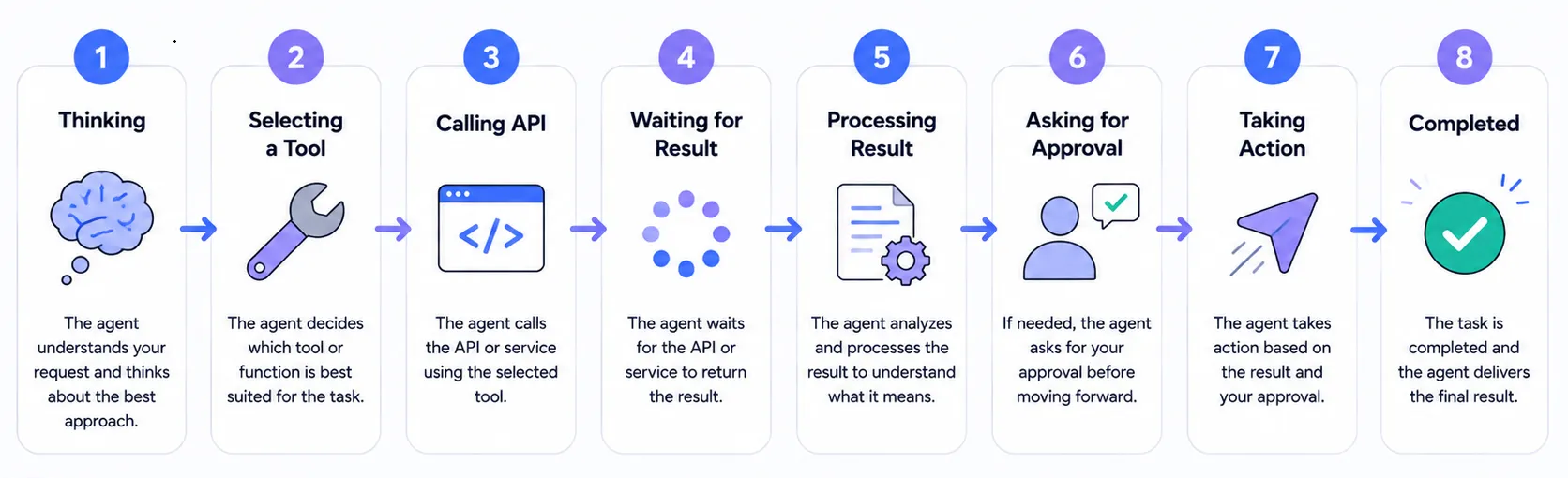
The interface needs to communicate what is happening.
That's where frontend development becomes especially important.
Users need to understand what the AI is doing and what it is allowed to do.
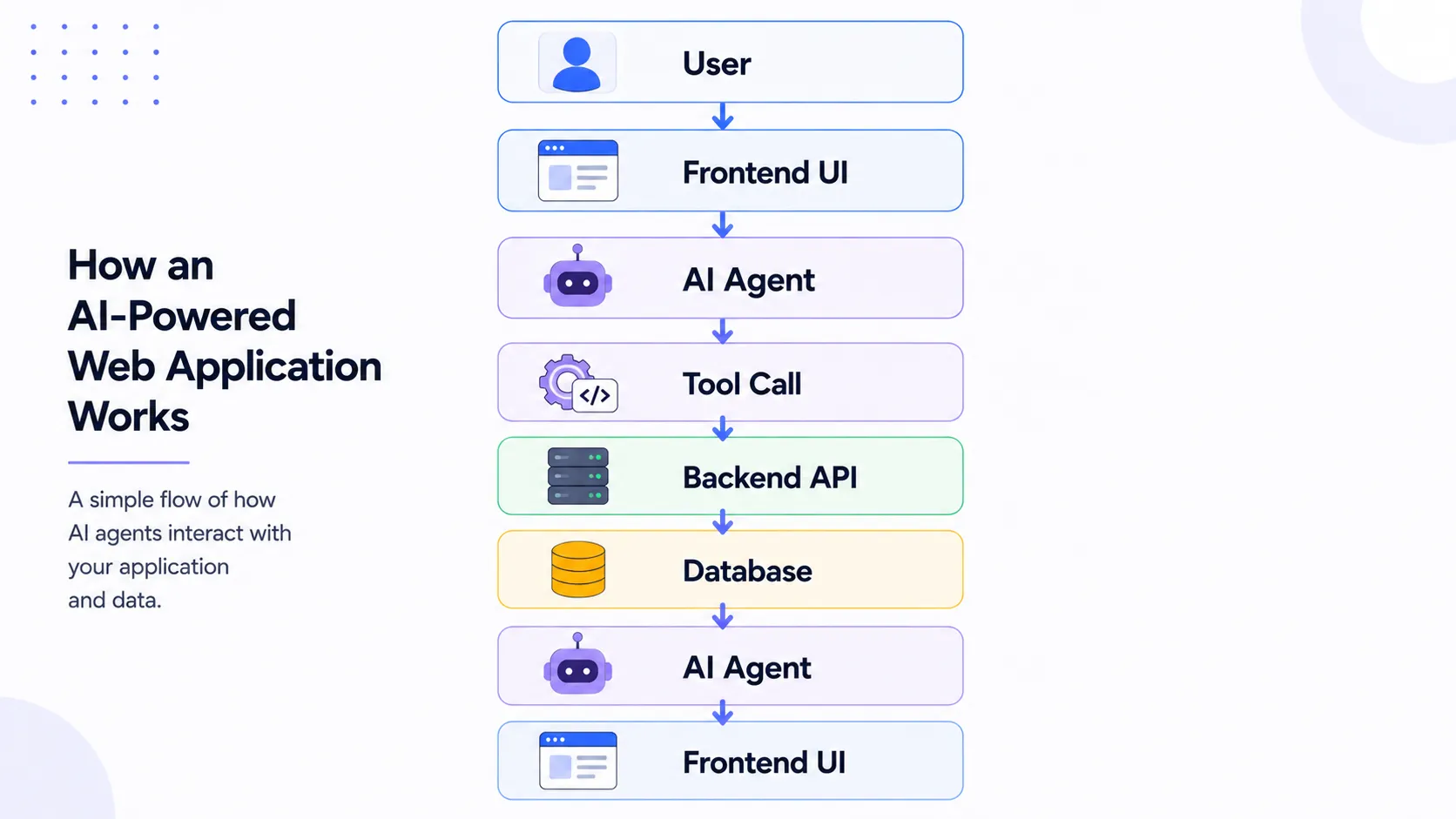
One of the most important concepts to understand is tool calling.
Imagine you build an AI assistant for an e-commerce application.
A user says:
"Show me my recent orders."
The AI model itself doesn't automatically know the user's orders.
Instead, the agent can have access to a tool such as:
getOrders(userId)
The agent decides that it needs that tool, calls the backend, receives the result, and then presents the information to the user.
The simplified flow looks like this:
This is where frontend developers can use skills they already have.
You already understand APIs, asynchronous operations, application state, authentication, loading states, and error handling.
AI agents add another layer on top of those concepts.
Frontend development includes plenty of repetitive work.
For example, imagine a project with dozens of similar components.
You may need to:
Update imports
Rename props
Add tests
Update documentation
Modify similar UI patterns
Check accessibility
Fix repeated issues
Review similar pull requests
An AI agent can potentially help coordinate some of this work.
Instead of manually repeating the same process across many files, you can define a goal and let the agent work through approved tools.
But this doesn't mean giving an agent unlimited access to your production environment.
For potentially destructive operations, human approval should remain part of the workflow.
A good rule is:
The more dangerous the action, the more control the developer should have.
Consider a traditional workflow.
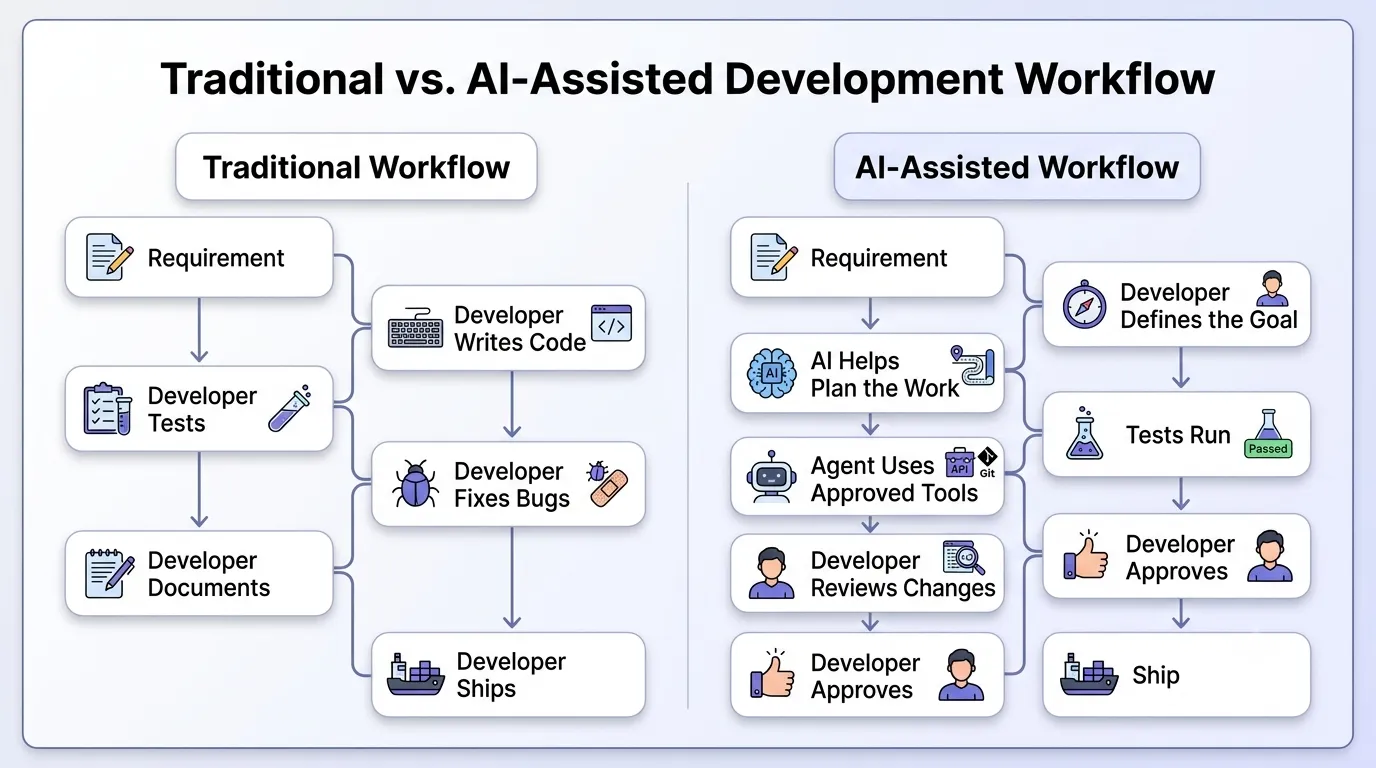
Notice something important.
The developer hasn't disappeared.
The developer's responsibilities have changed.
You still need to make decisions about:
Architecture
Product requirements
UX
Accessibility
Security
Performance
Testing
Code quality
Business logic
The difference is that AI can take on more of the repetitive implementation work.
This makes reviewing and directing AI-generated work an increasingly valuable skill.
You don't need to learn everything about artificial intelligence.
Focus on the concepts that connect directly to application development.
Start with the basics:
LLMs
Tokens
Context
Prompting
Structured outputs
Tool/function calling
Model limitations
You don't need to understand the mathematics behind every model.
You need enough knowledge to understand what the model can and cannot reliably do.
After learning basic LLM concepts, explore:
Agent workflows
Planning
Tool usage
Memory and context
Human-in-the-loop systems
Agent orchestration
The important question isn't just:
"How do I ask an AI model a question?"
It becomes:
"How do I design a system where an AI model can safely accomplish a task?"
That's a much more useful question for application developers.
Don't make the mistake of thinking your existing frontend skills are becoming irrelevant.
They aren't.
JavaScript and TypeScript remain important.
React, Vue, Angular, and other frameworks remain important.
So do:
State management
UI/UX
Accessibility
Performance
API integration
Error handling
Responsive design
In fact, AI-powered interfaces can make these skills even more important.
An AI response isn't useful if the interface is confusing.
An AI agent isn't trustworthy if the user doesn't understand what it is doing.
You don't have to become a backend specialist.
But you should understand how applications work beyond the browser.
Learn the basics of:
REST APIs
Authentication
Server-side logic
Webhooks
Databases
API security
This becomes particularly important when an AI agent needs to perform actions.
For example, an agent shouldn't directly access a database just because it can.
A safer architecture usually places controlled tools and APIs between the agent and sensitive systems.
Let's look at some realistic examples.
Problem: Developers spend time searching through codebases and fixing repetitive issues.
Agent: An agent can inspect relevant files, explain a bug, suggest changes, and potentially run tests.
Frontend responsibility: Build or integrate the development interface and review the generated changes.
Human review: Always verify important code changes before merging.
Problem: Support teams need to answer repetitive questions.
Agent: An agent can retrieve account information, search documentation, and help prepare a response.
Frontend responsibility: Build the dashboard where support staff can see conversations, agent actions, and suggested responses.
Human review: Sensitive or unusual cases may require a human decision.
Problem: Users struggle with complicated forms.
Agent: An AI assistant can help users understand questions, organize information, and guide them through multiple steps.
Frontend responsibility: Build a clear interface that lets users see, edit, and approve information.
Human review: The user should remain in control of important submitted information.
Problem: Reproducing frontend bugs can take time.
Agent: An agent could help analyze bug reports, logs, related code, and reproduction steps.
Frontend responsibility: Build an interface that presents the investigation and lets developers review findings.
Human review: Developers still need to confirm whether the diagnosis is correct.
These are useful possibilities, but not every one of them should be treated as a fully autonomous system today. The reliability of an agent depends heavily on the model, tools, data, permissions, and engineering around it.
Frontend developers already have many skills that are useful for AI applications.
You understand users.
You understand interfaces.
You work with APIs.
You manage application state.
You deal with asynchronous operations.
You think about loading and error states.
You care about usability.
All of these become important when building AI-powered products.
Consider a normal button.
The user clicks it and something happens.
Now consider an agent.
The user asks it to perform a task, and the agent may take several actions before completing it.
The UI needs to answer questions such as:
What is the agent doing?
What information is it using?
What tools can it access?
Did the action succeed?
Did something fail?
Does it need user approval?
Can the user stop it?
These are frontend problems.
The future of AI-powered UI isn't simply putting a chat box on every page.
It's designing interfaces that make AI actions understandable and controllable.
AI agents are powerful, but they aren't magic.
There are real problems developers need to understand.
AI models can generate information that sounds correct but isn't.
An agent can make an incorrect decision based on incorrect information.
AI can generate code that works in a simple example but doesn't fit the architecture of your application.
Giving an agent access to APIs and tools creates security concerns.
You need to carefully control permissions.
An agent that can read data is different from one that can modify or delete data.
If an agent processes untrusted content, that content may attempt to manipulate its instructions.
This is particularly important when agents can use tools or access sensitive information.
Traditional software usually follows explicitly defined paths.
AI systems can behave differently depending on the input and context.
That makes testing more complicated.
One of the biggest risks isn't the AI itself.
It's the developer who stops thinking critically because the AI usually appears to be correct.
Learning AI agents also means learning when not to trust them.
This is probably the question most developers are thinking about.
The honest answer isn't simply yes or no.
AI agents will likely automate some repetitive development tasks. They may reduce the amount of manual coding required for certain features.
But building a good product involves much more than writing code.
You still need:
Product thinking
UX judgment
Architecture
Accessibility
Debugging
Security
Performance
Communication
Testing
Code review
A generated component can look correct and still be a poor solution for the product.
An agent can complete a task and still misunderstand the business requirement.
That's why the more useful question isn't:
"Will AI replace frontend developers?"
A better question is:
"Will developers who know how to work effectively with AI have an advantage?"
That is much more likely.
The strongest developers may be the ones who combine solid engineering fundamentals with the ability to use AI effectively.
You don't need to learn AI agents all at once.
If you're already a frontend developer, you have a good starting point. You already know JavaScript, APIs, UI state, asynchronous code, and how web applications work.
Now you just need to connect those skills with AI.
Here’s a practical path.
Start with the basics you already use every day.
Make sure you're comfortable with promises, async/await, modules, APIs, state, and error handling.
You don't need to learn a new programming language just to get started with AI agents.
AI agents often need to communicate with other services.
Learn how APIs work, how authentication is handled, how data is sent and received, and how to deal with API errors.
If you already work with REST APIs, you're already halfway there.
You don't need to understand the mathematics behind large language models.
Start with a few practical concepts:
Models
Prompts
Tokens
Context
Structured outputs
Tool calling
The goal is to understand what an AI model can do—and where it can go wrong.
Don't start by building a fully autonomous AI system.
Build a small AI feature first.
For example, create a simple AI chat interface using React or Next.js. Send a prompt, display the response, handle loading states, and deal with errors.
This will give you a much better understanding of how AI fits into a real application.
This is where things start getting interesting.
Instead of only generating text, an AI model can request a tool to perform a specific task.
For example:
User → AI Agent → getOrders() → API → Database
The agent can then use the returned information to continue the conversation or complete the task.
Once you understand this pattern, AI agents become much easier to understand.
Now build something with a clear, limited purpose.
For example:
"Take a user's request and retrieve information from two approved APIs."
Keep the scope small.
The goal isn't to build the next autonomous AI platform. The goal is to understand how an agent makes decisions, uses tools, and handles results.
Not every action should happen automatically.
If an agent is about to delete data, send an email, update an order, or perform another important action, give the user a chance to approve it.
This is called human-in-the-loop.
It's a simple idea, but it's an important part of building reliable AI applications.
AI applications need more than normal frontend testing.
You also need to think about things like:
Unexpected model responses
Incorrect tool calls
Invalid inputs
Prompt injection
Data exposure
Permission problems
Don't assume that an AI agent will always do what you expect.
Test the happy path, but also test what happens when things go wrong.
This is where everything comes together.
Build something useful instead of another basic chatbot.
For example, create an AI interview assistant, documentation assistant, coding assistant, or research dashboard.
A real project will teach you much more than following ten tutorials.
If you're not sure what to build, here are some ideas.
Build a small dashboard that reads GitHub issues, summarizes them, and suggests possible solutions.
You'll learn: APIs, structured output, and agent workflows.
Create an assistant that searches your project documentation and helps developers find answers.
You'll learn: Context, search, and AI-powered UI.
Build a support dashboard where an AI suggests replies, but the support employee decides what gets sent.
You'll learn: Human-in-the-loop design and real-world AI UX.
Create an assistant that helps users complete a complicated form.
Instead of forcing users to figure out every field themselves, the AI can guide them through the process.
You'll learn: State management, validation, structured data, and conversational UI.
Give the tool an error message and relevant project information.
The agent can investigate the problem, look at related information, and suggest possible causes.
You'll learn: Tool usage, code analysis, and agent workflows.
Build an assistant that can summarize project updates, organize tasks, and suggest priorities.
You'll learn: Tool calling and multi-step workflows.
Create a dashboard where an agent gathers information from approved sources and presents the results in a useful format.
You'll learn: Agent workflows, streaming, and result-focused UI.
Build a tool that reviews UI content and suggests accessibility improvements.
You'll learn: AI-assisted analysis while using the frontend skills you already have.
An AI agent is a system that uses an AI model, context, and tools to complete a task.
The important difference from a basic chatbot is that an agent can be designed to take actions, not just generate text.
No.
You don't need to train models or become an AI researcher.
You need to understand the parts of AI that connect with the applications you build.
Yes—but don't skip the fundamentals.
Learn JavaScript, frontend development, APIs, and basic software architecture first. Then start adding AI capabilities to your projects.
They can automate some repetitive work.
But building a good product still requires UX decisions, architecture, accessibility, performance, security, testing, and understanding what users actually need.
AI can help with the work. It doesn't remove the need for good engineering judgment.
Python and JavaScript/TypeScript are both useful.
For frontend developers, JavaScript or TypeScript is a natural place to start because you can use the skills you already have to build AI-powered web applications.
A chatbot generally responds to your message.
An AI agent can be given tools and a goal. It can use those tools, process the results, and perform multiple steps to complete a task.
The exact behavior depends on how the agent is designed.
Quite a lot.
You can build coding assistants, support dashboards, AI search, research tools, form assistants, project-management tools, accessibility tools, and many other workflow-based applications.
You can learn the basic concepts fairly quickly.
Becoming good at building reliable agents takes longer because you need to understand tools, APIs, security, testing, context, and failure handling.
Don't rush it.
Build small projects, break things, figure out why they broke, and improve them.
That's how you'll actually learn.
Frontend development isn't disappearing because AI agents are becoming more capable.
The work is changing.
Just as developers adapted to frameworks, component libraries, cloud platforms, APIs, and modern development tooling, AI is becoming another part of the development stack.
The important thing is not to chase every new AI trend.
Learn the fundamentals.
Understand what AI models can and cannot do.
Learn how tools and APIs connect to agents.
Build interfaces that make AI actions understandable.
Add human approval where it matters.
Test everything that can affect users or production systems.
And most importantly, keep improving your ability to make good engineering decisions.
Learning AI agents isn't about abandoning frontend development. It's about adding a new capability to an already valuable skill set.
If you're a frontend developer in 2026, you don't need to become an AI expert tomorrow.
Start with one small AI-powered feature.
Then learn tool calling.
Build a simple agent.
Connect it to an API.
Add a useful interface.
Test it.
Break it.
Fix it.
That's a much better way to learn than simply reading about AI agents.
The developers who understand both frontend engineering and AI-powered systems will be in a strong position to build the next generation of web applications.
Be the first one to share your thoughts 💭